
Guide
DMX for beginners.
DMX looks technical, but its rules fit on one page. Here is what you need to wire your first fixtures and run your first show, with FutureLights or any other software.
CH 001The idea
What is DMX?
DMX (DMX512 in full) has been the common language of stage lighting since the late 1980s. The computer or console continuously sends a list of 512 values, each from 0 to 255, dozens of times per second. Each fixture reads the values meant for it and sets its colour, intensity or position.
DMX only travels one way: the console talks, the fixtures listen. That's why you have to tell the software which fixtures are connected, and at which address.
CH 002Vocabulary
Channels, universes, addresses and modes.
Channel
A value from 0 to 255 that controls one function: the red of a PAR, the intensity, the horizontal movement (pan) of a moving head…
Universe
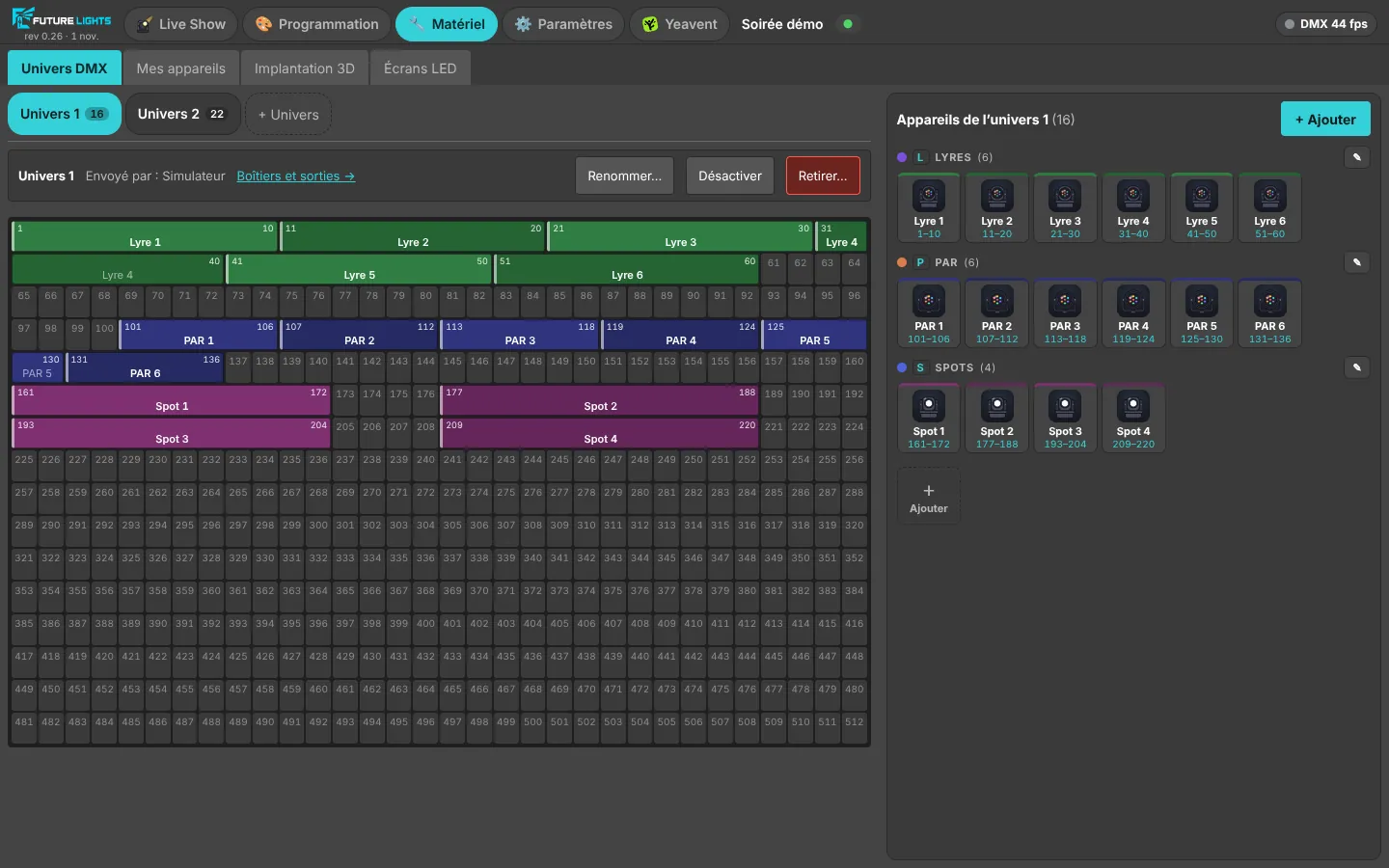
A line of 512 channels, which is what one DMX cable carries. A “1 universe” interface drives 512 channels, a “2 universe” one twice as many.
Address
A fixture's first channel. A 7-channel PAR set to address 1 uses channels 1 to 7; the next one can start at 8.
Mode
Many fixtures offer several modes, for example 7 or 13 channels. The mode set on the fixture must match the one in the software.
CH 003Wiring
From the PC to the fixtures.
The PC sends DMX through a USB interface, or over the network with Art-Net or sACN. A DMX cable runs from the interface to the first fixture, then from fixture to fixture: this is called a daisy chain.
Connectors are 3-pin or 5-pin XLR depending on the fixture; adapters exist. Use proper DMX cable rather than microphone cable, and put a terminator on the output of the last fixture: many mysterious flickers come from there.
Beyond 32 fixtures on one line, the standard calls for a splitter, which also helps cover long distances.
CH 004First show
Your first show, in five steps.
List your fixtures
For each fixture: brand, model, number of channels and the mode you chose.
Set the addresses
On each fixture, a start address with no overlap: PAR 1 at address 1, PAR 2 at 8, and so on.
Wire the chain
Interface, cable, first fixture, the next ones, and the terminator at the end.
Add them to the software
Same model, same mode, same address. In FutureLights, the button pages for each fixture then build themselves.
Test, then create
Switch fixtures on one at a time to check them, then build your first moods: a colour, a movement, a fade.
CH 005With FutureLights
What the software does for you.
FutureLights simplifies these steps: its library already knows many fixtures, the DMX universe grid shows your addressing at a glance, and “Identify” flashes the fixtures on an interface so you know which universe is where. The simulator and 3D Studio even let you prepare everything with no fixture plugged in.
Read on
Beginner questions
How many fixtures fit on one universe?
As many as their channels fit into 512: 73 PARs with 7 channels, or 32 moving heads with 16. In practice, the limit of 32 fixtures per line without a splitter often comes first.
Can two fixtures share the same address?
Yes, if they are the same model in the same mode: they will do exactly the same thing. That's handy for PARs that should always match.
Is an entry-level USB DMX interface enough?
To start with, often yes; what matters is that the software recognises it. FutureLights works with the USB DMX interfaces common among DJs and with FTDI-based interfaces (Open DMX, DMX USB Pro). During the beta, each model is validated with early users.
CH 512
Ready for your next party?
The beta is free. Leave your email, we'll write when your spot is ready.