
Free beta · PC, Mac and Linux
Free DMX lighting software for DJs, weddings and partiesParty lighting,finally simple.
FutureLights runs your moving heads, PARs and LED bars from a computer (PC, Mac or Linux), a tablet or a phone. Keep your DMX interfaces, describe the mood in one sentence, and get back to filling the dance floor.
Why FutureLights
Free, for real
The whole software, no time limit: desk, programming, interfaces, 3D Studio. Only the hosted AI will be paid, later on.
See plansKeep your interfaces
Works with your existing USB DMX interfaces, FTDI interfaces, Art-Net, sACN and your MIDI controllers.
Compatible hardwareAn AI lighting theme
“Tropical vibe, moving heads in a slow wave”: the AI builds the buttons, you see the result in 3D before applying.
Discover the AIFrom PC to phone
Play from the dance floor on your phone, have the moving heads follow your finger on the tablet, program on the PC.
All features
CH 001Simple
Easy to use.
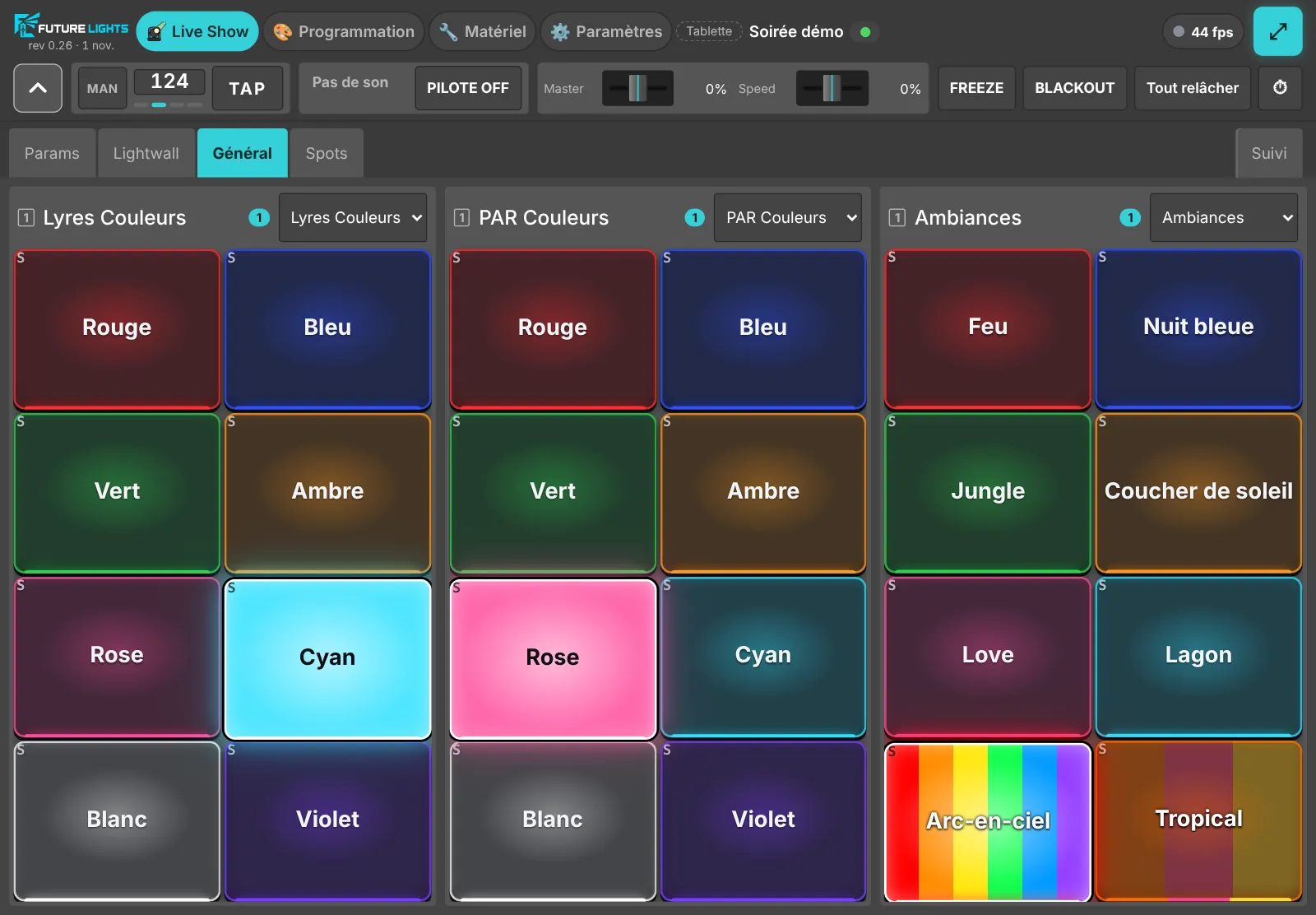
No need to be a lighting tech. Plug in your interface, add your fixtures, play: every button shows the colour it switches on, each fixture's page builds itself and the complicated settings stay out of your way.
- Buttons that show what they light up and glow while they play
- TAP for the tempo, an AUTO mode that follows the music
- Sync with your Link-compatible DJ software: Serato, Traktor, VirtualDJ, djay…
CH 002Prompt to lightshow
Describe the mood. The AI builds the show.
Tell it the mood of your bar, your party or your show: “amber lounge for happy hour”, “energy build for the final number”. The AI composes the colours, the movements and the buttons, you see the result in 3D, and nothing reaches the fixtures without your OK.
- A complete lighting theme from one sentence
- A photo of a manual: the channel table is read for you
- Your venue described in words becomes a fixture layout
Built-in AI, in beta. Turning a written running order into a full show is coming soon.
Discover the AI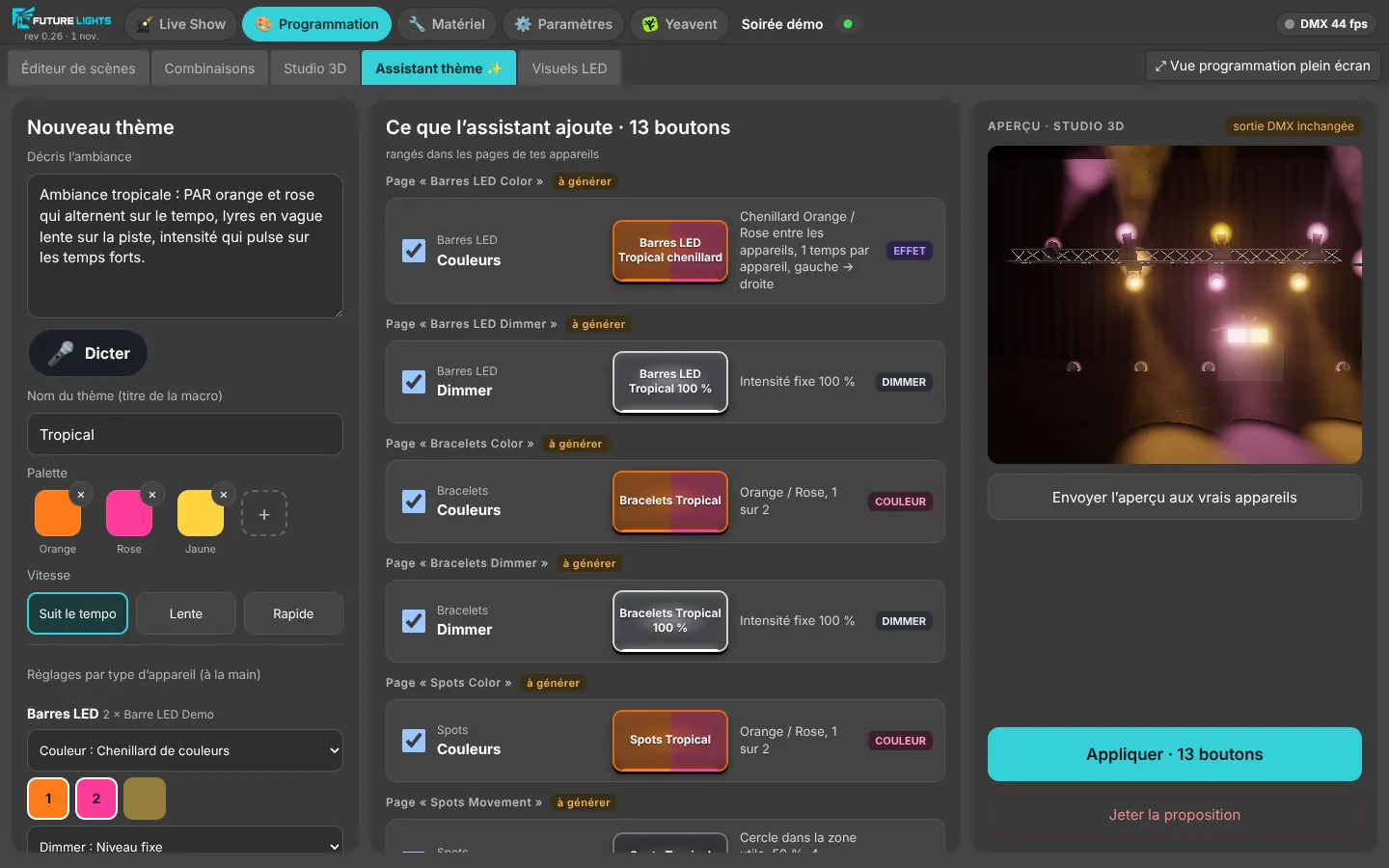
CH 003Who it's for
From beginners to show professionals.
DJs, MCs, technicians and stage managers, bars and clubs, community halls: everyone starts in a few clicks, then goes further whenever they like with the scene editor, effects and the 3D Studio.
All featuresCH 004All-in-one
Everything in one piece of software.
No more juggling several tools: console, programming, 3D visualisation, remote control and music sync all live in FutureLights.
- Live console and AUTO mode
- Scene editor and effects
- 3D Studio
- Finger tracking on tablet, control from your phone
- Music sync: TAP, AUTO mode and Link-compatible DJ software
- Yeavent quiz
- Open format and QLC+ export
CH 005Cloud backup
Your shows stay safe, even if the PC dies.
FutureLights can send a copy of your shows to our servers. It is encrypted on your PC before it leaves: nobody but you can open it, not even us. PC breaks down the night before a wedding? Restore everything on another one.
- Encrypted on your PC, with a recovery key to write down
- Never during a party: the backup waits for the end of the show
- Restore on another PC
CH 404Community
Join the FutureLights community.
On our Discord server, report a bug, suggest an idea and vote for the next features. Share your shows and ask other DJs, MCs and technicians your questions.
- 🐞 A forum to report bugs
- 💡 Your ideas, with votes to pick what comes next
- 🎛️ Your shows, your settings, help from others
CH 011Sections
Everything it can do.
Features
Live desk, finger tracking, 3D Studio, music sync, programming, LED panels, Yeavent quiz.
Hardware
USB DMX interfaces, FTDI interfaces, Art-Net, sACN, MIDI controllers, open format and QLC+ export.
Artificial intelligence
A lighting theme in one sentence, a manual scan, a venue described in words.
Plans
The software is free. Credit-based AI plans will come later.
Shop
Coming soon: preconfigured accessories, a mini Wi-Fi router and a game totem, ready to plug in.
FAQ
Computer, interfaces, no internet on the night, data: the short answers.
CH 512
Ready for your next party?
The beta is free. Leave your email, we'll write when your spot is ready.